
With our change of system, we have moved to One Advanced Patient Services solution.
You should have received an email with details on how to register - but if you haven't please click here to request registration.
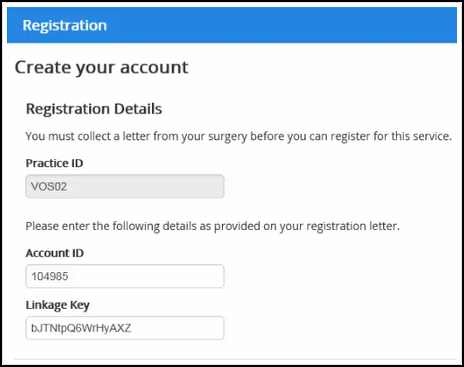
Once you have received your letter which will contain the practice ID, Account ID and Linkage key, click on the link above to register.
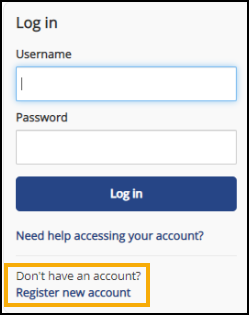
From the login screen, select "Register new account"
Select "Yes" to having received a registration letter.
Enter the Practice ID, Account ID and Linkage Key from the letter (easiest if copied and pasted)
Now complete account details
USERNAME - this is your unique name for logging into patient services and cannot be changed.
PASSWORD - Your password must be at least 8 characters containing at least one of each of three of the following.
- Uppercase letter
- Lowercase letter
- A number
- A symbol
Confirm PASSWORD
You must then complete the Personal Details which MUST match what is held on our computer system including the email address.
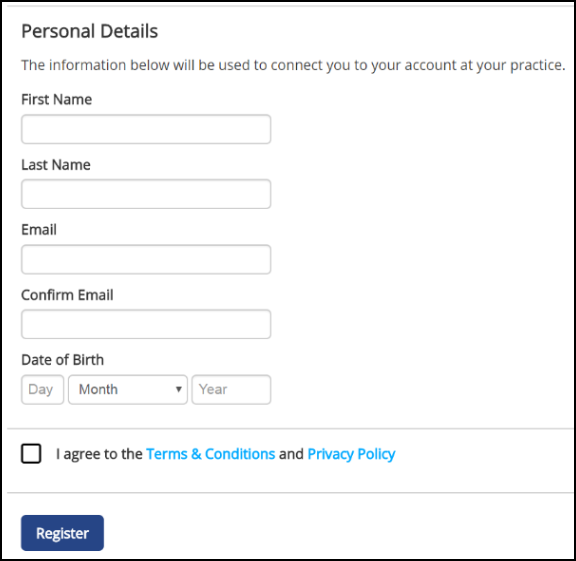
Confirm that you agree with the Terms and Conditions and click Register.
You will then receive a further email with a confirmation link which must be clicked to gain access.
Please check SPAM folders for these emails as they come from noreply@patient-services.co.uk which may be filtered out.
Once registered, you can click  button on the home page to access repeat prescriptions. Please only request repeats that are already authorised.
A video on how to make a repeat request is available here.